On this page
Key takeaways
- UPI is a payment method; Razorpay is a payment provider that can connect supported payment methods to your checkout.
- Verify payment information on your server before updating orders. A success screen or screenshot is not sufficient evidence.
- Plan for delayed updates, repeated events, refunds and settlement matching as part of the integration.
A payment integration should connect what the customer sees at checkout with what your team sees in orders and accounts. Accepting a payment is one step; confirming its status, fulfilling the order and matching the settlement are separate parts of the workflow.
This guide explains the decisions behind a UPI and Razorpay integration for a website, mobile app or business system. It is a planning guide for business owners and delivery teams, with official documentation linked for implementation details.
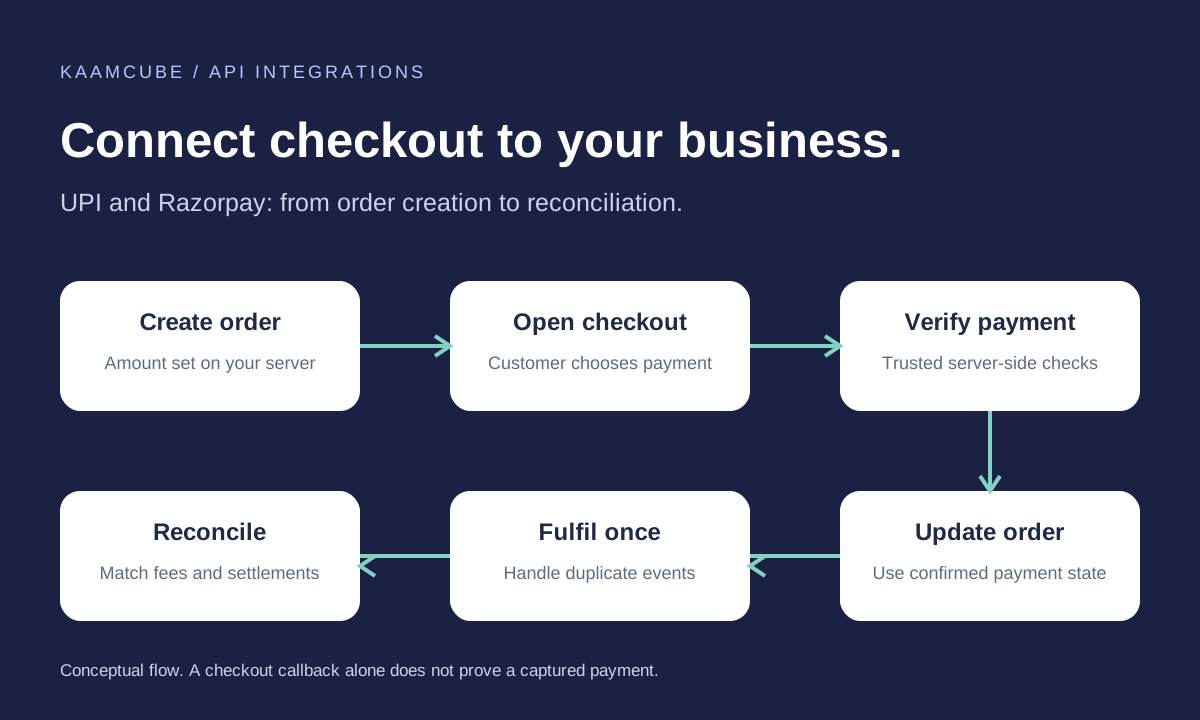
How payment gateway integration works
Create the order
Your backend calculates the payable total and creates the provider order. Keep your own order reference linked to the provider reference.
Open checkout
The customer selects an available payment method. Keep private API credentials on the server.
Verify the result
The backend validates the checkout response and checks that payment details match the expected order, amount and currency.
Apply the confirmed state
Use trusted payment status to decide when to fulfil. An authorised payment and a captured payment are different states.
Track the business outcome
Connect order updates, refunds and settlement records to the people and systems that need them.
Razorpay's server integration steps explain order creation and signature verification. Its capture settings guide describes how authorisation and capture differ.
Plan the UPI checkout experience
Choose a checkout approach supported by your platform and merchant account, then test the actual devices your customers use. Confirm which methods are enabled rather than assuming every option appears for every business.
Write clear messages for successful, failed and pending attempts. If the customer returns from a payment app before the final status is available, show that verification is in progress and provide an order reference. Give support staff a way to find the attempt without asking customers to share sensitive payment information.
Before development, agree how checkout connects to stock, bookings or enrolment. A business may need to reserve an item while payment is pending and release it if the attempt expires. These rules belong in the project scope.
Webhooks and reliable payment status
Webhooks notify your backend about events even if the customer closes the browser. Verify the signature using the raw request body and webhook secret before accepting the notification. Follow Razorpay's webhook validation guidance.
Notifications are asynchronous and can arrive more than once or out of order. Record processed event identifiers and protect the order transition so a repeated notification cannot send another item, create a second booking or issue a duplicate receipt.
Monitor failed deliveries and unresolved payments. A server-side status lookup can help recover uncertain cases. Treat polling as a controlled recovery tool rather than repeatedly refreshing the customer screen. Razorpay documents delivery retries and duplicate handling in its webhook best practices.
Reconciliation: connect payments to your books
A paid order does not mean the matching amount has already reached your bank. Keep payment, refund and settlement records separate, and link them using reliable references. Account for fees and adjustments when matching deposits.
Use the provider dashboard and reports to investigate differences. Confirm your account's settlement schedule and eligibility directly with the provider; this guide does not assume a universal transfer time. Razorpay's settlement documentation explains the distinction between capture and bank settlement.
If payments need to reach Tally, Zoho Books or an ERP, define the fields, account mappings and approval process with the accounts team. Agree how partial refunds, failed synchronisation and corrections will be reviewed. Automation should leave a traceable record and a queue for exceptions.
Testing and launch checklist
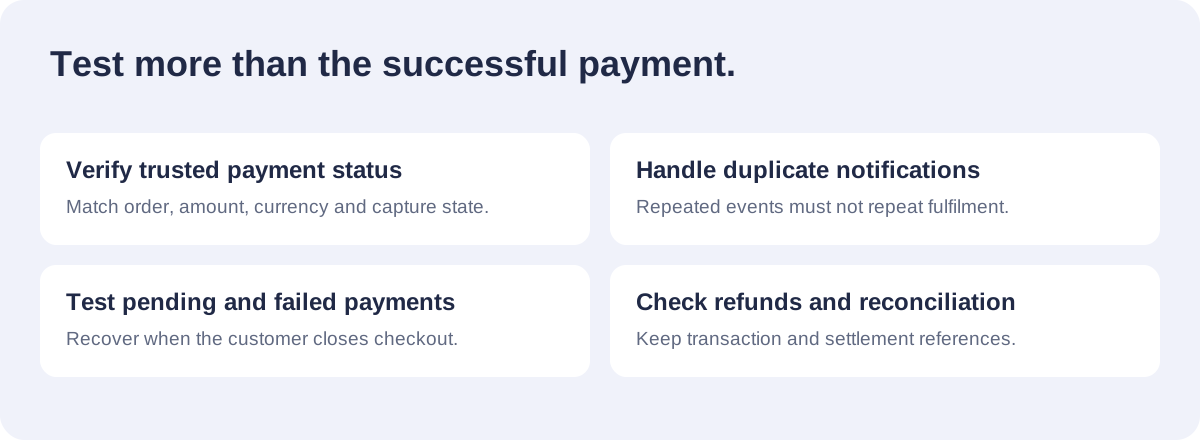
- Successful payment: verify the correct order is updated and fulfilment happens once.
- Cancelled or failed attempt: confirm the customer can recover without losing the order context.
- Pending result: test the messages and support process while confirmation is outstanding.
- Duplicate or delayed event: check that repeated notifications do not repeat business actions.
- Refund: verify the request, provider status and internal record remain linked.
- Account sync: demonstrate settlement matching and a failed integration retry.
Keep test and live configuration separate, restrict dashboard access and transfer account ownership to the business. Record who monitors payment errors, who approves refunds and how support escalates a disputed or unresolved transaction.
Kaamcube's API integration services connect payment workflows to websites, apps and business software. Share your platform, payment provider and order process through our contact form to discuss the required scope.
Frequently asked questions
Is UPI the same as Razorpay?
No. UPI is a payment method. Razorpay is a payment provider that can offer supported payment methods through an integration, subject to the merchant account and configuration.
Can a success page confirm that an order is paid?
A success page alone is not sufficient. The backend should verify payment information and the required payment state before treating the order as ready for fulfilment.
What happens if the customer closes checkout?
Your backend can still receive verified webhook updates. Keep the order reference and provide a way for the customer or support team to check the confirmed status.
Can webhooks be delivered more than once?
Yes. Handle repeated events safely so they do not create duplicate fulfilment or receipts, and do not assume notifications always arrive in order.
Can payments sync with accounting software?
Payment records can be connected to accounting or ERP workflows where the required interfaces are available. Define field mappings, refunds, settlement matching and exception handling before development.
What does an integration quote depend on?
The scope depends on your platform, checkout approach, order rules, refunds, accounting connections and testing requirements. Share these details so the proposal can identify included work and external charges.